RootsMagic for Legacy Family Tree Users
Bring your Legacy Family Tree file into RootsMagic, with your people, places, sources, notes, media, and tags.
RootsMagic imports Legacy files directly on Windows and Mac, and the free edition, RootsMagic Essentials, does it too.
NEW!
RootsMagic 12
Plant and grow your family tree.
Genealogy & Family Tree Software
RootsMagic 12 is award-winning genealogy software that helps you discover, document, and share your family history.
Two ways to bring your tree over
Import your Legacy file
RootsMagic reads Legacy Family Tree files directly, from Legacy version 3 and later. Your people, places, sources, notes, media, and tags all come over, with no need to export first.
Use a GEDCOM file
Export a GEDCOM file from Legacy or any other program, and import it into RootsMagic.
Watch the move, step by step
See a Legacy file come into RootsMagic 12, tags and all, and how to check that everything came over, in under three minutes.
Playing the video loads it from YouTube.
See it in RootsMagic 12
On the File page, click Import from Another Program and choose Legacy Family Tree. RootsMagic lists the Legacy files it finds on your computer, or you can browse for one. Pick yours, name the new RootsMagic file, and your tree comes over.
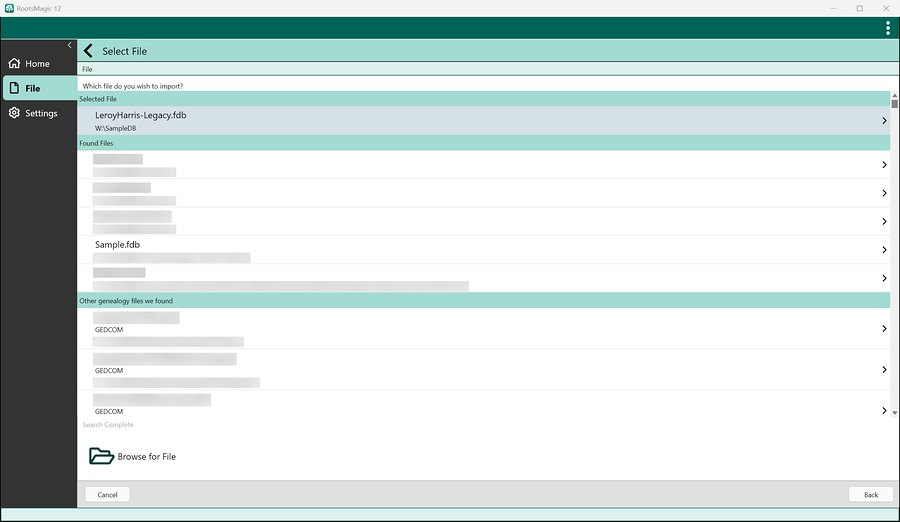 Pick your Legacy file. (Other files on this computer are blurred here.)
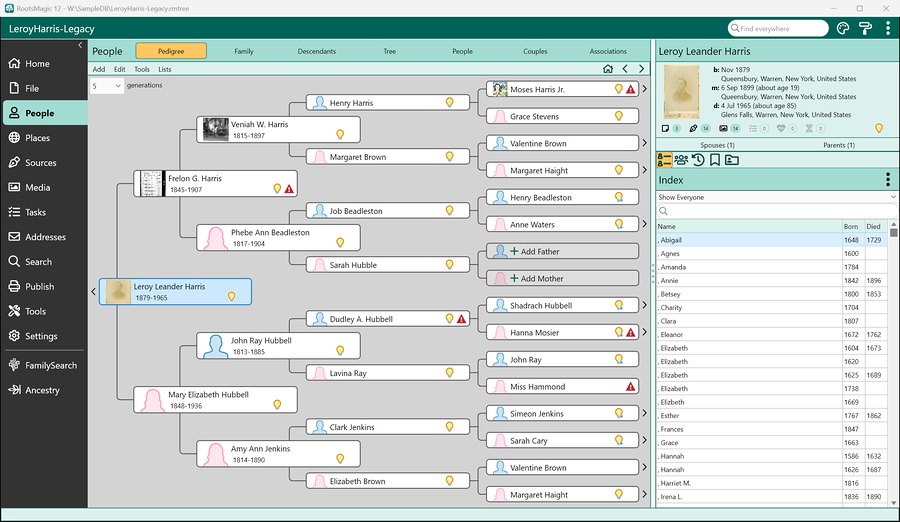 The same tree in RootsMagic, with its photos and sources.
What you'll find in RootsMagic
- FamilySearch Certified: download from Family Tree and share changes back
- Works with Ancestry: upload or download your tree free, with TreeShare sync and Ancestry hints in the full version
- WebHints from Ancestry, FamilySearch, MyHeritage, and Findmypast
- Source templates based on Evidence Explained (4th edition), with suggestions as you type
- 100+ reports and charts, plus wall charts as large as you need
- DNA matches with Leeds Method clustering
- Windows and Mac, and it can run from a USB flash drive
- Yours to keep: no subscription, free updates to RootsMagic 12, and personal technical support
Try it with your own tree
Download RootsMagic Essentials free, import your Legacy file, and see your tree in RootsMagic.
When you're ready for more, the full version is a one-time purchase of $29.95.
Questions from Legacy users
Yes. RootsMagic imports Legacy Family Tree files directly, from Legacy version 3 and later. You don't need to export a GEDCOM file first.
Your people, places, sources, notes, media, and tags all come over when you import your Legacy file.
Yes.
RootsMagic Essentials, the free edition, imports Legacy files directly too.
Yes. RootsMagic runs on both Windows and macOS, and both import Legacy files directly. Copy your Legacy file to your Mac and import it there.
More about RootsMagic for Mac.
Yes. RootsMagic is FamilySearch Certified. You can download from FamilySearch Family Tree and share your changes back.
More about RootsMagic and FamilySearch.
No.
RootsMagic Essentials is free with no time limit, and you can unlock the full version later with a registration key.
RootsMagic Essentials is free. The full version of RootsMagic is $29.95. It's yours to keep, with no subscription, and updates to RootsMagic 12 are free. When a new version comes out, upgrading is optional, and owners get a lower price.